This is the final installment of the three-part series on building my own website.
In Part 2, I covered the AI collaboration tools and built out the core of the blog — i18n, MDX, and the view-count system. This time, I'll walk through the Resume page, Command Palette search, and everything that went into getting the site shipped.
Resume Page — Banner-Avatar Header Layout
The banner-avatar header is what sets the first impression on the Resume page. It's simple to implement but lands well visually.
I referenced UntitledUI's design and wanted the layout to feel familiar — like a LinkedIn or Facebook profile page. The result is a header that conveys "who this person is" at a glance, right down to the blue check badge that gives it a social media feel. The full-width banner with the circular avatar overlapping its bottom edge is pulled off with just CSS positioning.
<section className="overflow-hidden rounded-2xl border bg-card">
  {/* Banner */}
  <div className="relative h-48">
    <Image src="/cover.png" alt="Cover" fill />
  </div>

  <div className="px-6 pb-6">
    <div className="flex flex-col gap-3 sm:flex-row sm:items-end">
      {/* Avatar — -mt-12 pulls it up over the banner */}
      <div className="relative z-10 -mt-12 h-24 w-24 shrink-0">
        <Image
          src="/avatar.png"
          alt="Jerome Cheon"
          width={96}
          height={96}
          className="h-full w-full rounded-full border-background object-cover"
        />
        {/* Blue check mark */}
        <span className="absolute right-0 bottom-0 flex h-6 w-6 items-center justify-center rounded-full bg-[#1D9BF0] text-white">
          <BadgeCheck className="size-4" />
        </span>
      </div>
    </div>
  </div>
</section>
The -mt-12 negative margin and border-background border color do the heavy lifting. The avatar appears to "punch through" the bottom of the banner, and the border color automatically follows the dark/light theme switch.
The About section has a Read more toggle that collapses long bio text at 300 characters, with a smooth expand effect driven by a max-height CSS transition.
The largest section on the Resume page is Projects. Since I already had my portfolio content organized in Notion, rewriting it as a TypeScript file would have been work entirely unrelated to building the app itself. Pulling it directly from the API kept development time down and left the door open to migrate to static data later.
Notion CMS — Moving Project Data Out of the Codebase
I already had my projects documented in Notion, so I decided to serve that data directly rather than duplicate it.
I registered a Notion API key and installed @notionhq/client to wire up the integration.
Building a thin layer in lib/notion/ on top of @notionhq/client, two things needed the most attention:
1. Exponential backoff retries: Notion's rate limit is fairly low, which means 429 errors can pop up intermittently during builds. This is the fix.
// apps/web/lib/notion/projects.ts

async function withRetry<T>(fn: () => Promise<T>, maxRetries = 3): Promise<T> {
  for (let attempt = 0; attempt < maxRetries; attempt++) {
    try {
      return await fn()
    } catch (err) {
      const isRateLimit =
        err instanceof Error && err.message.includes('rate_limited')
      if (isRateLimit && attempt < maxRetries - 1) {
        await new Promise((resolve) =>
          setTimeout(resolve, Math.pow(2, attempt) * 1000)
        )
        continue
      }
      throw err
    }
  }
  throw new Error('Max retries exceeded')
}
Retries at 1s → 2s → 4s intervals. If an API call fails mid-build, the build won't crash — it'll retry until it succeeds or exhausts the limit.
2. Deduplication with React.cache(): When multiple components need the same project list, wrapping in cache() pins it to exactly one API call per request.
// apps/web/lib/notion/projects.ts

export const getProjects = cache(async (): Promise<Project[]> => {
  try {
    const notion = getNotionClient()
    const dbId = process.env.NOTION_PORTFOLIO_DB_ID
    if (!dbId) return []

    const response = await withRetry(() =>
      notion.dataSources.query({ data_source_id: dbId })
    )

    return response.results
      .filter(isFullPageOrDataSource)
      .filter(isFullPage)
      .map((page) => ({
        id: page.id,
        name: extractTitle(page.properties, 'Name'),
        description: extractRichText(page.properties, 'Description'),
        tech: extractMultiSelect(page.properties, 'Tags'),
        period: formatPeriod(extractDate(page.properties, 'Date')),
        markdownContent: '',
      }))
  } catch (err) {
    console.error('[notion] getProjects error:', err)
    return []
  }
})
If the Notion API goes down, getProjects returns an empty array, while getProjectById falls back to the static data in lib/resume/data.en.ts so individual project pages stay functional.
The Resume page uses ISR with revalidate: 1800 (30 minutes), so Notion changes propagate without a redeploy.
Command Palette Search — Static JSON Index Strategy
The first question when building global search was: can I avoid running a dedicated search server? Algolia or a hosted search service would be powerful, but felt like overkill for the current scale. Since all the content is already managed as MDX files, the idea that emerged was: generate a JSON index at build time and serve it from the CDN — no server needed.
- Build-time index generation: Registered a script in the
pnpm prebuildhook so the index is built automatically beforenext buildruns.buildIndexForLocale()reads each locale's MDX files, parses frontmatter, and writes a JSON combining posts and section navigation entries topublic/.
// apps/web/scripts/build-search-index.ts

function buildIndexForLocale(locale: Locale): SearchIndexItem[] {
  const localeDir = path.join(CONTENT_DIR, locale)
  const items: SearchIndexItem[] = []

  if (fs.existsSync(localeDir)) {
    const files = fs.readdirSync(localeDir).filter((f) => f.endsWith('.mdx'))

    for (const file of files) {
      const filePath = path.join(localeDir, file)
      const { data } = matter(fs.readFileSync(filePath, 'utf-8'))

      const slug = (data.slug as string) ?? file.replace(/\.mdx$/, '')
      const category = data.category as string | undefined
      // Stored without locale prefix — CommandPalette's useRouter prepends it at runtime
      const url =
        category === 'tech' || category === 'life'
          ? `/${category}/${slug}`
          : `/tech/${slug}`

      items.push({
        type: 'post',
        slug,
        title: (data.title as string) ?? slug,
        description: data.description as string | undefined,
        category,
        tags: (data.tags as string[]) ?? [],
        publishedAt: data.publishedAt as string | undefined,
        url,
        locale,
      })
    }
  }

  // Posts + section nav items (Home, Tech, Life, Resume)
  return [...items, ...NAV_ITEMS[locale]]
}
The resulting search-index.ko.json and search-index.en.json live in public/ and are served directly from the CDN. No API endpoint, no server cost, and fast response times.
- Runtime behavior: Pressing
/orCmd/Ctrl+Kopens the Command Palette, which fetches the index JSON once. Every keystroke after that triggers immediate client-side filtering. Clicking a result usesnext-intl'suseRouterto navigate while preserving the current locale — if you're reading in English and search, you stay on English routes. The UI is built with shadcn/ui'sCommandcomponent (powered by cmdk).

Current filtering is metadata-only (title, tags, description) — full-text body search isn't supported yet. If the content volume grows, swapping in Fuse.js-based fuzzy search is on the table.
SEO — Next.js Metadata API
App Router made metadata management noticeably cleaner than I expected. SEO is something you end up spending more time on than planned when building a blog, but generateMetadata handles per-page dynamic metadata out of the box — no extra plugins needed.
On post detail pages, the frontmatter title, description, and tags map straight to OG tags.
Sitemap and robots.txt are generated automatically via Next.js's file-based conventions. app/sitemap.ts iterates all post slugs and emits locale-prefixed URLs (/ko/, /en/), while app/robots.ts registers the Vercel deployment URL as the sitemap location.
// app/sitemap.ts (conceptual structure)
export default async function sitemap(): Promise<MetadataRoute.Sitemap> {
  const posts = await getAllPosts()
  const postEntries = LOCALES.flatMap((locale) =>
    posts
      .filter((p) => p.locale === locale)
      .map((p) => ({
        url: `${siteUrl}/${locale}/${p.category}/${p.slug}`,
        lastModified: p.publishedAt,
      }))
  )
  return [...staticPages, ...postEntries]
}
Vercel Deployment — Monorepo and Environment Variables
The most common sticking point when deploying a monorepo is the Root Directory setting.
For a Turborepo monorepo, setting Root Directory to apps/web in Vercel is the key step — that one setting tells Vercel which package to build, and everything else falls into place.
After connecting the GitHub repository, I registered the environment variables in Vercel's project settings and opted out of preview deployments.
Vercel's Analytics integration comes down to two lines:
// app/[locale]/layout.tsx
import { Analytics } from '@vercel/analytics/next'

export default function RootLayout({ children }) {
  return (
    <html>
      <body>
        {children}
        <Analytics />
      </body>
    </html>
  )
}
The Vercel dashboard then shows per-page visitor counts and path stats alongside the Supabase view-count data — a useful pair for understanding content performance.
Wrapping Up
From first plan to first deployment, it took about 8 days — a bit longer than the rough estimate going in.
Here's the Claude usage data for the full project (2026-05-12 ~ 05-19, 8 days):
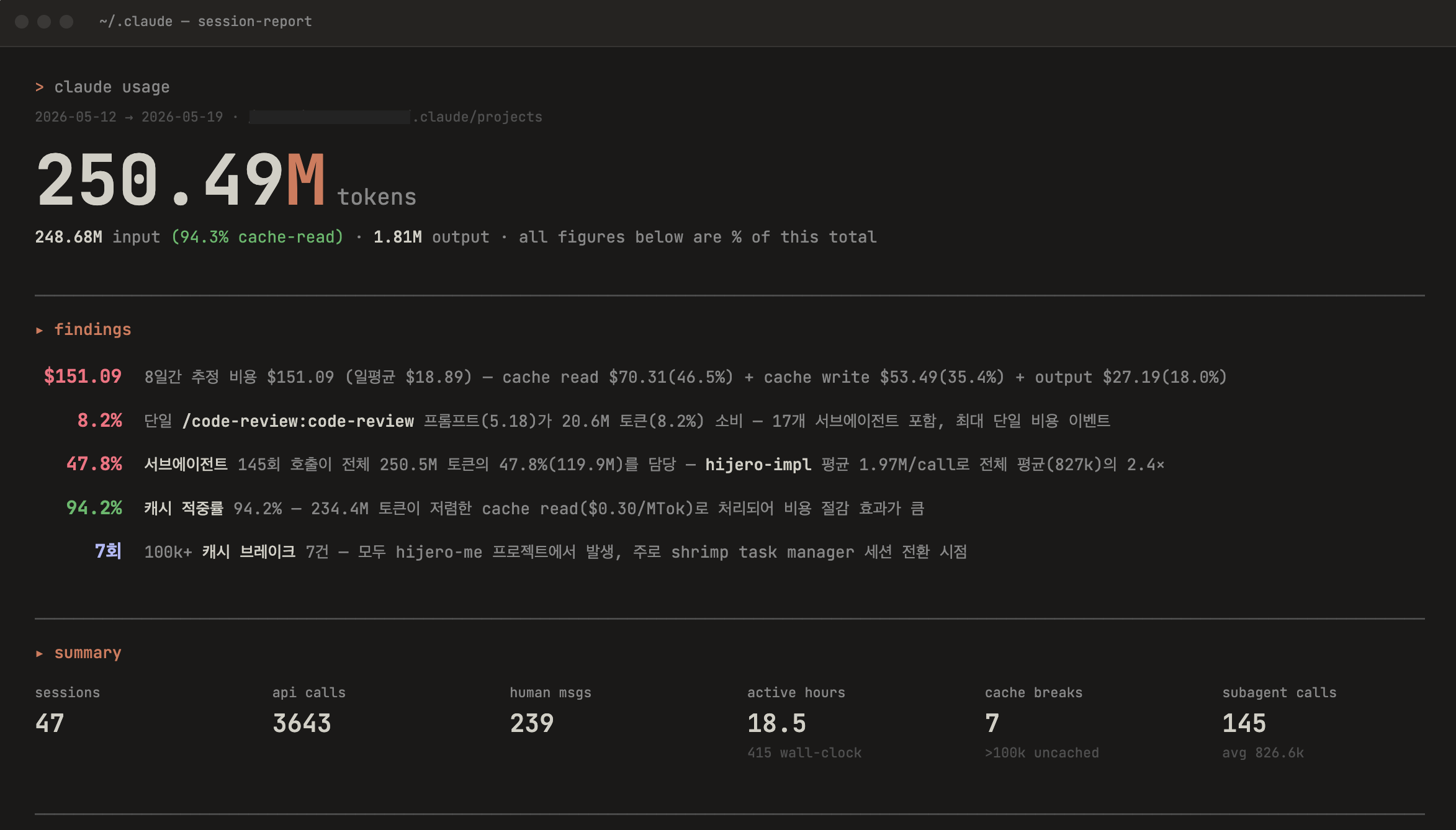
Active working time was 18.5 hours, with 3,643 API calls and approximately 250.5 million tokens consumed (248.7M input + 1.81M output). Estimated cost came to $151.09 (claude-sonnet-4-6 pricing), averaging $18.89 per day.
Breaking down costs: cache reads $70.31 (46.5%) · cache writes $53.49 (35.4%) · output $27.19 (18.0%). The primary driver was 145 subagent calls accounting for 47.8% of total tokens. Shrimp Task Manager's dependency graph and task context are large enough that reading them fresh each session made cache costs the biggest line item.
I asked Claude to weigh in on these numbers, and the verdict was: within normal range.
A 94.2% cache hit rate is healthy. The 47.8% subagent share is expected given the Shrimp Task Manager-driven automation workflow. At $18.89/day during an active feature sprint, the cost is reasonable.
One thing I only realized after reviewing the report: I had been hitting /clear whenever context reached around 80%, thinking that was the clean move. What I didn't realize is that each new session triggers another cache write of large config files like CLAUDE.md — so the more sessions you create, the higher the cache write costs climb. Now that I know, I'll be reaching for /compact much more aggressively on the next project.
The PRD → Validation → ROADMAP → Shrimp Task Manager pipeline meant I always had a clear answer to "what should I be building right now," and working with AI on top of that context kept things moving without drift.
Two things stood out about the AI collaboration approach.
First, setting Claude Code's output-style to learning. Instead of just pasting generated code, I received implementation choices alongside the reasoning behind them — which meant understanding grew alongside the codebase rather than lagging behind it.
Second, defining two separate subagents — hijero-scaffold and hijero-impl. The scaffold agent was scoped strictly to laying out structure and leaving TODO(human) markers; the core logic and design decisions were mine to fill in. Having AI assist without taking over kept me in the driver's seat on the codebase, which turned out to be good for both productivity and learning.
That wraps up the initial build of hijero.me. Next up: a dedicated dashboard for side projects, a custom domain, and performance optimization. I'll document those as separate posts as they happen.
The source code is on GitHub, and the live site is at hijero-me.vercel.app.
I hope this series has been useful to anyone thinking about building their own site with AI. Thanks for reading.